Previously, I posted about the new
Firefox 4 Beta 1. I also mentioned how sometimes we experience browser lags when he have multiple chat boxes open in Facebook.
For those who would rather wait until Firefox finalizes their release, and prefer to use their current Firefox browser, here's a simple trick how to 'unlag' your Firefox browser during those multiple Facebook chat sessions:
Step 1:
Open Firefox.
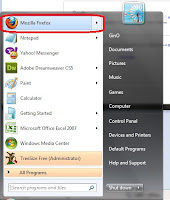 Step 2:
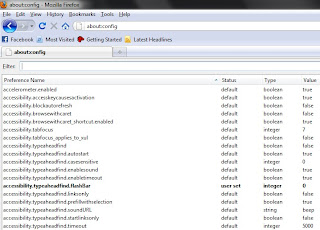
On the browser's address bar, type in "about:config" without the quotes.
 Step 3:
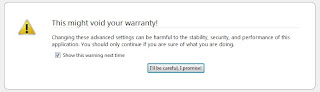
A reminder appears, asking you to be very careful. And yes, this is serious stuff, so, just follow my steps. Click on the "I'll be careful, I promise!". Again, without the quotes.
 Step 4:
A bunch of selections will appear. And most of them are gibberish settings we don't know. But, do not fear. We only need to adjust one.
 Step 5:
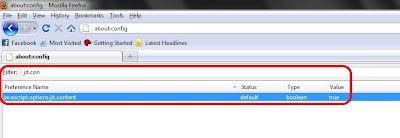
In the filter search, type in: "jit.con". The remaining search result should be "javascript.options.jit.content". It's current value is "true".
 Step 6:
Change the current value from "true" to "FALSE" by double clicking on the "javascript.options.jit.content" command.

Now you will be able to chat without the lag in Facebook. Enjoy!
Yes, you! We want your feedback! We believe that by seeing your feedback, we can help improve our blog and in turn, we can serve you more efficiently.
Also, if you have any questions, suggestions or any violent reactions, don't hesitate to post a comment or send us a
feedback.
 Finally! Alexa has updated it's rankings! Here's a statement from their site: